This feature is only available with Forge-enhanced, NeoForge and Fabric servers, so ensure you're using that software! We'll first cover how to install a mod, and then we'll move on to installing a modpack.
We offer a free mod and modpack installer in the panel, provided your server runs Forge. Simply navigate to those sections, search for the mods or modpacks you want, and click install. If you prefer to upload your own, continue reading!
🧩 Installing a Mod 🧩
To install a mod, first make sure you have the .jar file of the mod you want. We'll use WorldEdit as an example. Once you have the mod file, go to the mods folder on your server and upload the .jar file.

Then, restart the server. Your mod should now be applied and usable.
🔌 Installing a Modpack 🔌
A modpack consists of a zip file containing multiple mods. The installation process is straightforward. Upload the modpack .zip file to the mods folder using sFTP or web upload. Then, right-click the file and select "unarchive".
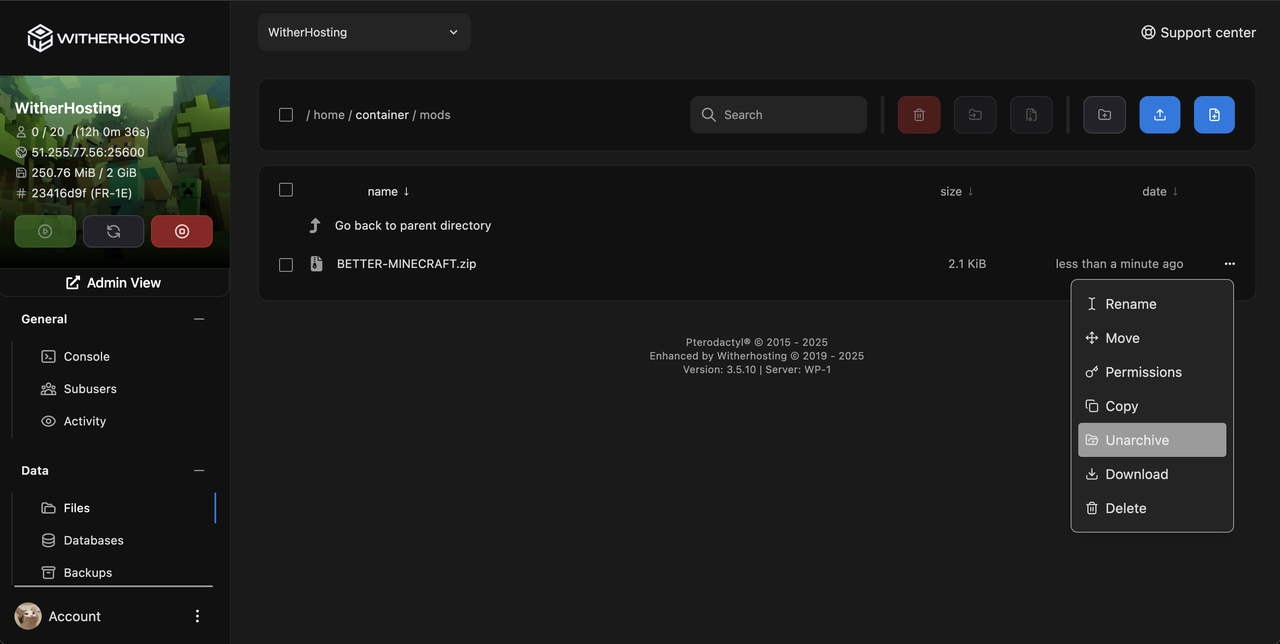
All the mods in the modpack should be placed in the mods folder. Once you've done this, restart your server and the modpack should be applied!
Consider that Forge mods are not compatible with Fabric and vice versa!
Updated on: 11/02/2025